Case Study

OIA SECURITY DASHBOARD

Oman Investment Authority, Sultanate of Oman

innovation-image

Overview

OIA wanted to have a monitoring dashboard to illustrate and summarize the process of establishing an In-House soft SOC (Dashboard).
Business Need

OIA need the following real time data in single dashboard from 9 different system
  • Identify internal and external threats: A list of findings, observations, and expectations of the exposable threats.
  • Monitoring Authentication activities: Authentication activities with added context, such as logins in critical systems and failed login attempts greater than a given threshold. (Live tracking table, list, etc…)
    • Admin login
    • Failed login
    • Abnormal Attempts | Brute-Force
    • Database & application logins (including external vendors)
  • Monitoring Account management activities: Monitoring of user account creation, deletion, and other activities to monitor resource and system access privileges. (Live tracking table, list, etc…)
    • Creation of new account
    • Deletion of account
    • Enabling / Disabling Account
  • Monitoring Connection activities: Monitoring of connection activities to provide an overview of the network connections by status, origin, and direction. This defines whether connections are allowed/denied, the hostname, country name of the source, and destination and direction. (Live map, chart, or activity monitoring).
    • VPN Connection
    • Emails
    • Nmap Scanning Attempt
  • Monitoring threats, malware, and vulnerability detection: Activities related to threats, such as indicators of compromise, malware infections, and identification of vulnerable systems. (Table, diagram, bars, etc…)
    • VPN Connection
    • Emails
    • Nmap Scanning Attempt
  • Monitoring Authentication activities: Authentication activities with added context, such as logins in critical systems and failed login attempts greater than a given threshold. (Live tracking table, list, etc…)
    • Abnormal Traffic
    • Data flow
    • Connection
    • Application
    • Database

Solutions

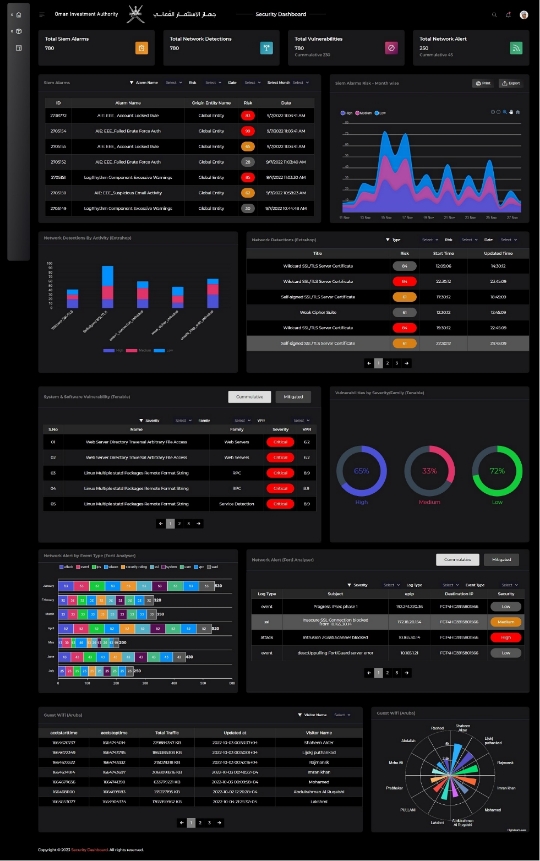
We developed the security dashboard which connected to 9 different system API’s and shows real time data in single dashboards. The data is customized to show in different ways as per the user role of the user. The system was also integrated with active directory for auto login of authorized users. There is also facility to generate and send automated weekly and month reports, raise alarms and escalations etc.
We connected to API’s of the following system through the respective API of each system:
  • CISCO AMP
  • Tenable
  • ExtraHop
  • Seclytics
  • LogRhythm
  • FortiGate
  • Aruba ClearPass
  • Dcapsula
  • Picus
Scheduler was created in the internal server to realtime connect and retrieved the data from all API’s and insert into the application database.

Key Highlights

  • Dashboards accessible to various users based on Roles & Permissions.
  • Data from 9 different systems shown in single dashboard
  • Real time data shown in dashboard
  • Option to see historical data for previous dates.
  • Option to filter data using different criteria
  • Option to choose custom charts
  • Tabular and graphic data available for users.
  • Option to see Cumulative and Mitigated data
  • Separate dashboard for management users
  • Separate reports for each API
  • Auto generate weekly summary auto generated as pdf
  • Automatic alerts to show critical vulnerabilities from all 9 systems with escalations.
  • Integrated with Active Director for Auto Login
  • Scheduler for automatically synchronising data from all 9 API

Result

  • Security monitoring made easy from single dashboard instead of logging into separate systems.
  • Improved efficiency of security reporting, tracking and resolving.
  • Management gets quick summary of the security alarms
  • Get instant alerts for high level alert from all systems in single dashboard
  • Get escalations from all systems in single dashboard
  • Streamlined Security Monitoring and feedback.
  • Transparent security monitory and reporting process
  • Reduce time and efforts
innovation-image innovation-image innovation-image